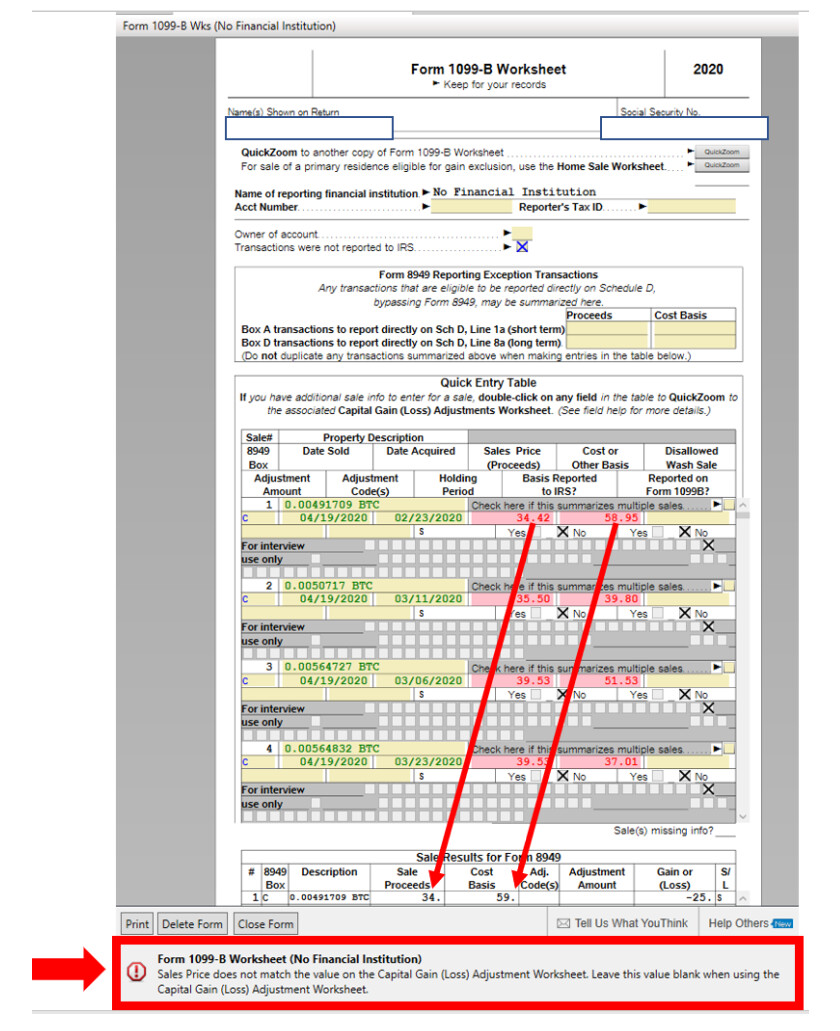
The Turbotax “CD/DVD” txf files needs to have the ‘cost’ and ‘sales’ values rounded to nearest whole dollar ($).
There is an issue in which the imported data for the CD/DVD version of Turbotax needs to be rounded to nearest whole dollar units for the Form 1099-B Worksheet to work correctly.
Otherwise, the final Turbotax check is tagging all the imported entries with 2 decimal places as errors.
Manually correcting to nearest whole dollar on the Form 1099-B Worksheets corrects the issue.
However, manually correcting hundreds of transactions is not practical.
The reported error is:
Form 1099-B Worksheet
Sales Prices does not match the value on the Capital Gain (Loss) Adjustment Worksheet.
Leave this value blank when using the Capital Gain (Loss) Adjustment Worksheet.
I added a screen grab so you can see on the 1099-B Worksheet Form the error is caused by 2 decimals which need to be rounded to nearest whole dollar to resolve.
Thank you.