
Any update on the Koinly dev team getting this fixed?
Same here. I won’t be upgrading my Koinly account for the next account unless this is fixed
Add a column called “Outstanding Loan” to the end and it will work
1 Like
This worked for me, Thanks!
EDIT: Well it imported, but my balances are wrong…
1 Like
Hi @mmanz.eth and everyone here,
Thank you for your patience with us, and thank you to @Nathan_Howell! 
You are absolutely right. Nexo has changed its CSV format and has removed the Outstanding Loan column.
Our dev team does have this fix currently in progress. My apologies for this inconvenience of the manual addition to the CSV.
If anyone is having trouble adding the “Outstanding Loan” column to their file, please connect with our support team so that we can help! 
Have an awesome day!
1 Like
hi there yeah the workaround did work however now i can confirm that it is missing transactions for some reason as mentiond above also as the files have all ready been imported re importing them does not seem to work at the moment as it looks like its skipping them. when this fix is fixed it looks like the wallet may have to be deleted and then recreated but im not 100% sure on this. @Michael_Koinly has this also been confirmed ?
when is it expected to be working? still having issues…
Hi @Nathan_Howell,
You’re correct about deleting the wallet and then recreating it with importing the amended CSV file.
Recreating the wallet may resolve the skipped rows, though please do reach out to our support team.  That way we can investigate the account and assist with missing purchase histories and persisting CSV discrepancies.
Having the team check inside the account will give us a better opportunity to be targeted with the resolution.
We’ll look forward to connecting on this, man.
Have an awesome day!
This is so frustrating! Still doesn’t work by adding “outstanding loan” column and saving as CSV.
How hard could it be for Koinly to fix this? It didn’t work last tax season either.
any update on this fix yet ?
1 Like
Can you like fix this !!!
Hi @Nathan_Howell, @sergei_benkovich, and @Lee_Brittain,
Thank you all for your continued patience with us, and my apologies for the inconvenience with the Nexo CSVs. The dev team is currently in progress on fixing this issue. I don’t yet have an ETA, though if you connect with our support team, please mention you would like to be notified once this is ready to go and has been fixed. You’ll be immediately alerted when the team has completed their work. 
Additionally, we don’t want to stall anyone’s timeline. We have a support team that can certainly help to amend your files while this issue is being fixed. If you would like to be contacted when the import issue is sorted, we can also review your Nexo files in the same support conversation.
Though this is a frustrating hinderance for so many, we do want to help save you time and effort by getting those files to import with our support team.
I’ll look forward to signaling here the moment we know it’s been resolved. Thank you all and have a wonderful holiday season!
3 Likes
Thanks for the update Michael - looking forward to getting this issue resolved.
I’ve contacted Support and hopefully they can help with a hotfix soon
Hi everyone,
I found a workaround to make it work and get the correct values.
First you need to add, as already mentioned, the “Outstanding Loan” column (I open the csv in VS Code).
The second problem is transactions made via Nexo Pro, for example, in this transaction I deposit USDT into Nexo Pro, exchange USDT for USDC, and transfer USDC and USDT back to Nexo.
These 3 transactions should be merged into a single transaction of this type.
Where:
USDT = -2673.84393636 + 2.88636892 = -2.670.95756744
USDC = amount of the second transaction with its conversion into dollars
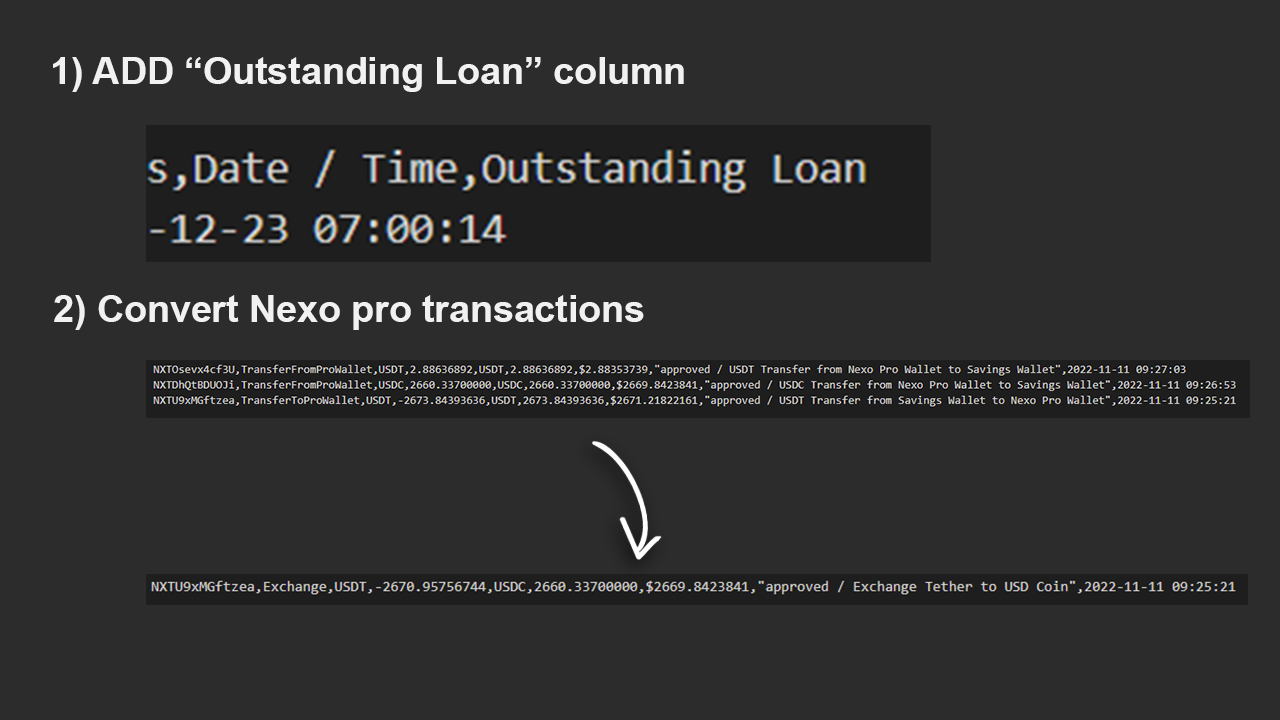
I hope this workaround can be useful to someone 
1 Like
Hi guys,
Any update on fixing issue? It’s been 2 months since the issue appeared.
Regards,
Ivan
Hi @zzargo, @IvanEft, @Daniel_7, and all!
Thank you all for your stellar patience with us, and a massive shout of gratitude to @malvaphe for the shared workaround!
I’m very happy to report the devs have completed their work on the Nexo CSV files from the recent format change. 

If anyone experiences an issue, we would love to know right away. Please do connect with us here if hurdles pop up, so we can quickly sort those out.
Have an awesome day and get your swerve on with those imports. 
2 Likes
Thanks! Just imported successfully.
1 Like
This topic was automatically closed 60 days after the last reply. New replies are no longer allowed.