
Describe the problem:
Hello
I’ve got perhaps a noob question. Looking at my transactions i see that there is number of them doubled. These are obviously repeated transactions
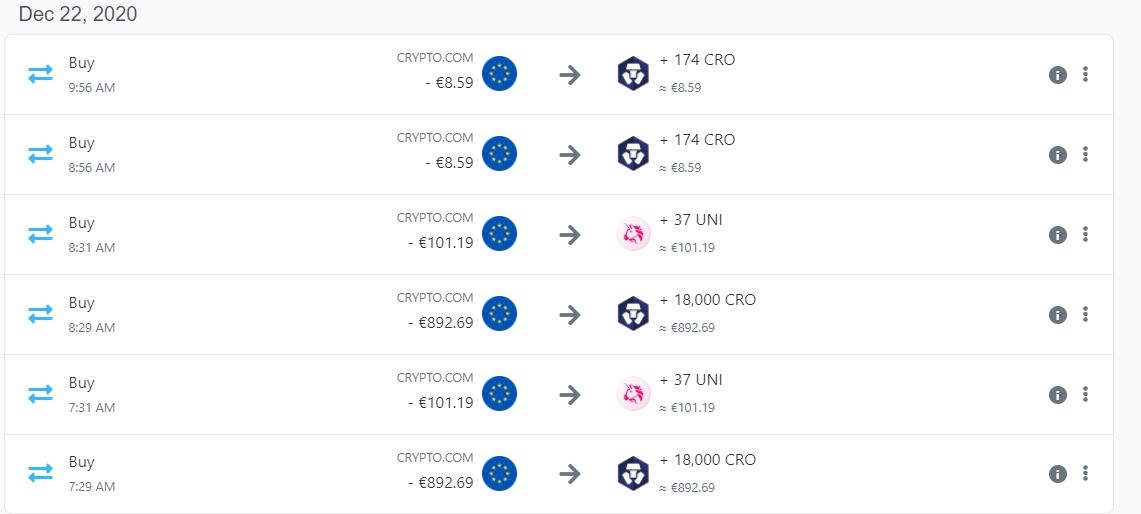
They have a difference of 1 hour and strangely their IDs are also different. I wonder what is the correct way of fixing that since it has an effect on the tax report. Which exchange/wallet is this regarding?
How did you import data into this wallet?
via a csv file
What have you tried to fix this so far?
Nothing so far as I am new to Koinly. I nevertheless tried to search for a similar topic but didn’t find anything
Ok thanks, it is clear. But in my case i have only used csv importing. And i don’t have all the transactions doubled but only trades, i.e. buy and sell.
So I’m still wondering what is the right way of correcting that to have an accurate tax report at the end
Actually that’s a good idea indeed- thanks!
But in my case it won’t help as I was practically using only the Crypto App and i didn’t even import any data from the Exchange. So to my point of view there is an issue with the processing of data from csv file. I imagine I could delete duplicated lines but I am still confused by the fact that they have different transactions ID.
indeed it looks so -i.e. csv extracted from CRYPTO app shows all the trades twice. It makes me think that this is a bug of CRYPTO app. I will try asking their support and share the outcome if any
I have deleted the wallet and downloaded again the same csv file while leaving time zone as UTC. Previous time I’ve downloaded the cvs and selected my actual time zone. That’s probably was the source of data duplication