
Dashboard graph wrong after importing unsupported coin

So, I wanted to add an unsupported wallet and coin.
I created a custom wallet and imported a CSV with a list of transactions and koinly asked which coin this was for.

I picked one which I thought it was and the transactions imported.

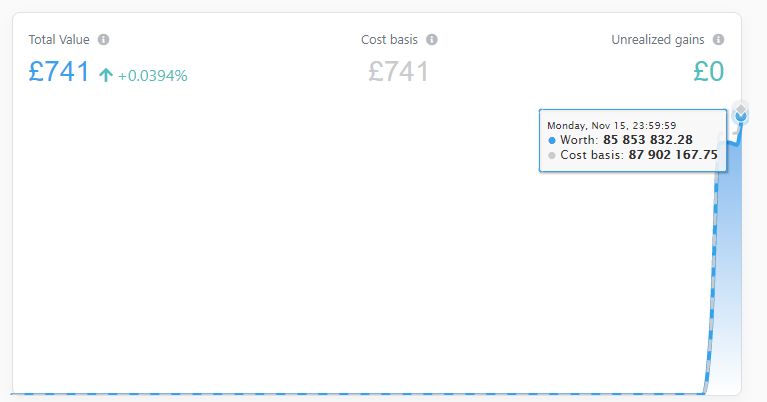
When I checked the transactions Koinly said I had £85M (I wish)

So I deleted the wallet and tried again and discovered that I can’t add in an unsupported coin.

Problem now is that the graph on the dashboard still shows a value of £85M. How do I refresh this back to what it was?
I had a similar issue trying to import an unsupported coin of terra luna.
It was so bad I just deleted the wallet.
Koinly is almost unusable without being able to use Terra, Avax, etc…

Yeh I deleted the wallet.
I left it for a few days, synced up wallets and exchanges but still have a huge £85M bump for transactions that don’t exist.

You might be able to fix the problem of £85m in loose change - apart from sending me some.
On Dashboard, scroll down through the individual coins and see if you can find the coin or token with the excess amount; click the + at that coin, and you will see which wallet contains the extra coins, and you can then either completely delete that wallet, or just delete the incorrect transactions

Stephen

If you delete all transactions for that coin, it should clear the graph but might take some time. Happened to me when coinmarketcap went wrong couple of weeks ago. Had a scam token rising it’s value for thousands but I deleted all its transactions and the graph cleared after couple of days

This topic was automatically closed 60 days after the last reply. New replies are no longer allowed.